The Makeblock Advanced Robot Kit stands out as one of the most versatile and powerful kits for school-aged learners and hobbyists. Designed for students who are ready to move beyond simple snap-together robots, Makeblock blends mechanical construction, electronics, and programming into a single, modular system. For MAK Technology’s robotics classes, this kit is a perfect bridge between fundamental concepts and advanced STEM projects.
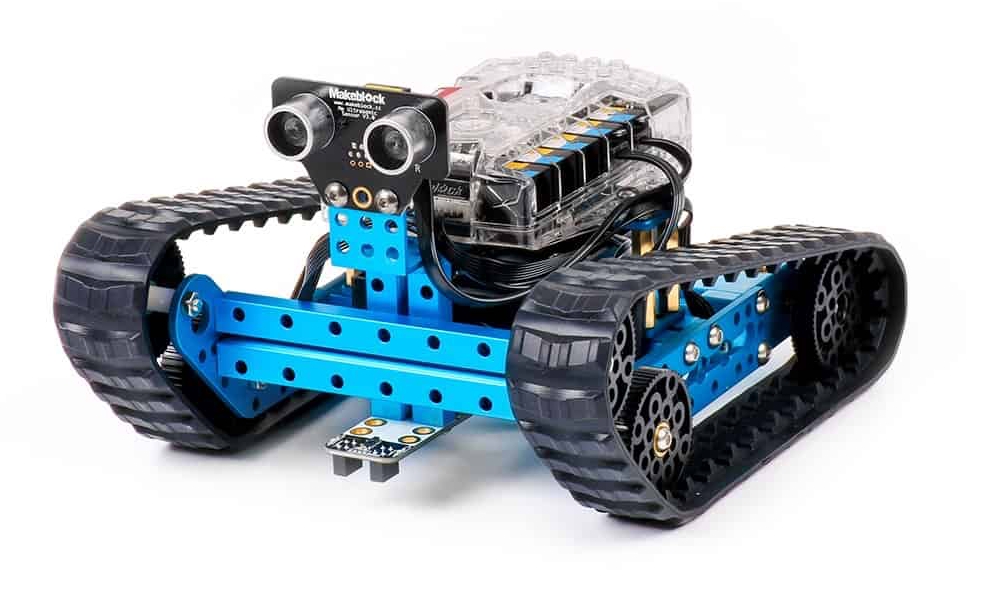
Makeblock’s Advanced Kit typically includes metal structural parts, smart motors, wheel modules, sensor modules (ultrasonic, line follower), servo motors, cables, a compatible microcontroller (often an mCore or similar), and a graphical programming interface. The metal parts allow durable builds; smart motors reduce wiring complexity and provide precise control. Combined, these components let students build wheeled robots, robotic arms, line-followers, and other custom projects.
Students working with Makeblock achieve measurable skills:
Mechanical design: Understanding frames, torque, gear ratios, and balance.
Electronics & wiring: Learning how sensors and actuators communicate with a microcontroller.
Programming: Using block-based coding (e.g., Makeblock’s mBlock, which is Scratch-like) and progressing to text-based code (Python/Arduino) for advanced control.
Systems thinking: Integrating hardware, software, and logic to build complete robot behaviors.
Troubleshooting & iteration: Debugging hardware issues and iterating designs to improve performance.
Best for ages 10 and above, especially students comfortable with assembling parts and beginning programming. In MAK Technology classes it’s ideal for:
Intermediate-level modules (after simple mechanics and electronics).
Project-based learning units (4–8 week projects).
Competitive robotics training (example: line following, obstacle avoidance challenges).
Line-following race bot: Teach PID basics and sensor calibration.
Autonomous obstacle-avoider: Use ultrasonic sensors and state machines.
Robotic courier: Program a robot to pick up and deliver small payloads.
Robotic arm add-on: Combine with a kit arm for pick-and-place challenges.
Remote-control bot: Introduce wireless control and telemetry.
Start visual: Use block coding first, then introduce text code.
Modular projects: Split the full kit into smaller teams where each builds a subsystem.
Scaffold complexity: Begin with pre-built modules, then ask students to redesign.
Assessment: Use rubrics for design, programming, collaboration, and documentation.
Pros: Durable metal build, scalable to complex projects, supports both block and text programming.
Cons: Higher price point (investment for schools), steeper learning curve for younger kids.
Makeblock aligns with MAK Technology’s goal to build future-ready learners. Its balance of mechanical, electrical, and programming elements enables deep learning and prepares students for robotics competitions and further studies in engineering, AI, and automation.
If you’re equipping an advanced robotics track at MAK Technology, the Makeblock Advanced Robot Kit is a strong long-term investment. Want a sample lesson plan, week-by-week syllabus, or procurement list for batch purchases? I’ll prepare a class-ready module and supplier options for you.
WhatsApp us